📨 💌 📱
📨 Canvas Messages 📨
📚 Welcome to Message Central! 📚
Time to learn how to send messages like a pro! The Canvas Inbox is your direct line to communicate with your teacher and classmates.
📬 What Makes Canvas Messaging So Cool? 📬
The Canvas Inbox isn't just regular email - it's designed specifically for school! You can message your teacher or classmates about course content, and it all stays organized in Canvas!
📮 Know Your Inbox Buttons! 📮
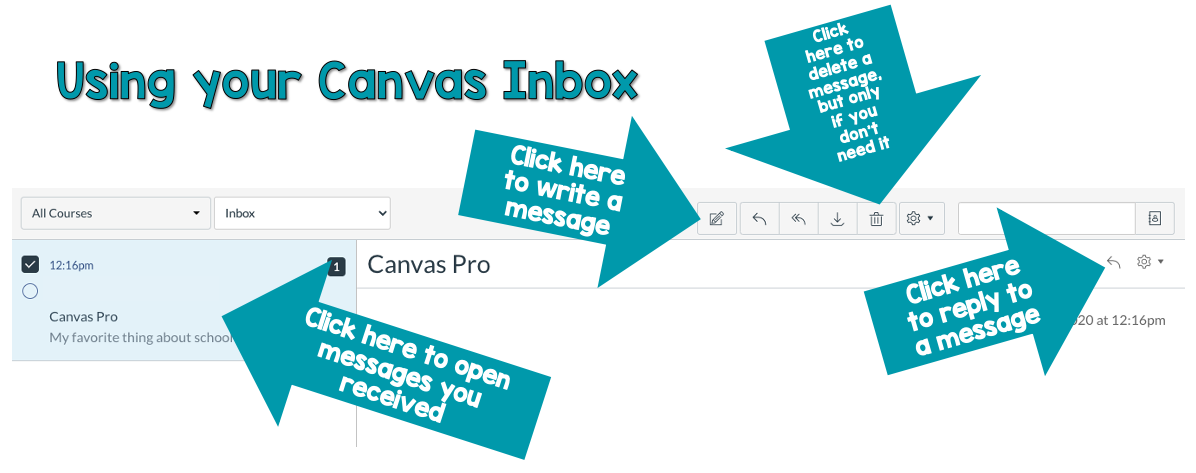
Study this image to become an inbox navigation expert! Each button has a special purpose to help you communicate effectively. 🎯
📝 Message Like a Professional! 📝
Even though it's not exactly email, you should still write messages professionally! Here's how to be a messaging superstar:
Write a Subject Line - Tell people what your message is about!
Start with a Greeting - Say "Hi" or "Hello" to be polite!
End with a Signature - Sign your name at the end!
🎪 Pro Tip: Think of Canvas messages like writing a friendly letter! Be clear about what you need,
be polite, and always say thank you. Your teachers will be impressed by your awesome communication skills! 😊
🎬 Watch This Helpful Tutorial! 🎬
This video will show you exactly how to use the Canvas Inbox like a pro! 🎯
🎉 Communication Superpower: Good communication skills will help you in ALL your classes!
When you can clearly explain what you need help with, teachers can give you better support! 🚀
✉️ 🎪 🌟
📌 YOUR NEXT STEPS:
1. Watch the video to learn how to use Canvas Inbox 🎬
2. Click "Mark as done" ✅
3. Click "Next" ➡️
1. Watch the video to learn how to use Canvas Inbox 🎬
2. Click "Mark as done" ✅
3. Click "Next" ➡️